Free stock market simulator

Practice Investing With Pretend Money: and See If You Beat the Index

Buy and sell real US stocks and ETFs with practice money. Every trade asks for your reason, every result is measured against an index fund, and an AI coach explains anything on screen without ever advising you.

No real money, everReal US pricesWorks in your browser

4.9/5 on Shopper ApprovedReviewed by Associate Professor Charles Lo, CPA, PhD
166 practice portfolios
How counted
Published in the latest simulator snapshot, 9 Oct 2026, 22:00 UTC. It counts shared virtual portfolios, not registered people, finished lessons or investing success.
View the published board
StockEducation simulator
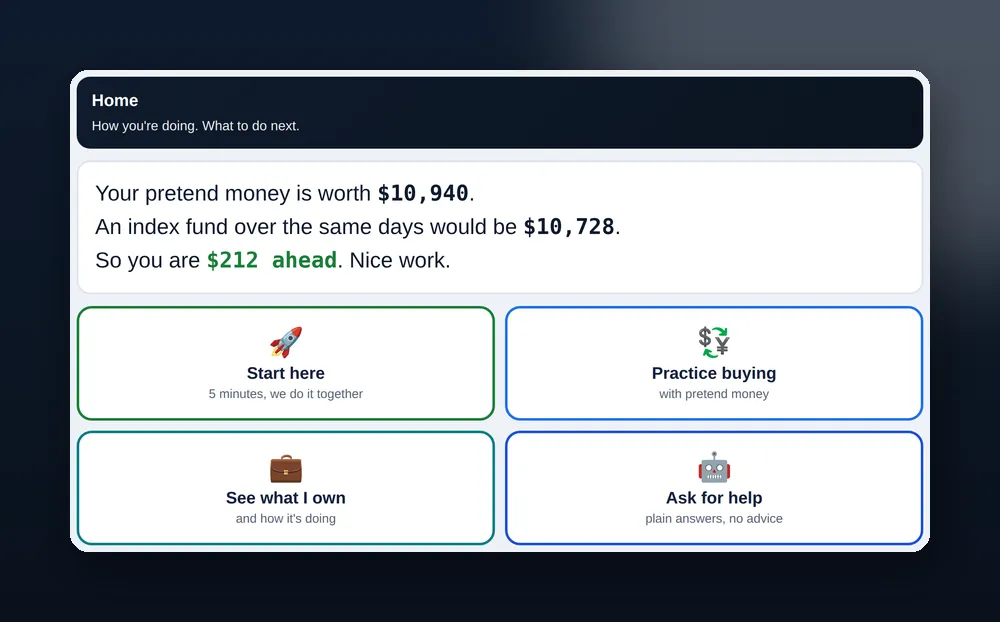
The simulator Home screen: your pretend money compared with an index fund, then four big buttons: Start here, Practice buying, See what I own, Ask for help
Illustrative simulator preview · tap to enlarge
Your first five minutes

Four Buttons, and You Are Investing

The home screen keeps it to four choices, so a complete beginner knows exactly what to press first.

  • Start Here

    Five minutes, and you build your first portfolio with the coach beside you.

  • Practice Buying

    Place a pretend order and write the reason. See what it costs and why.

  • See What You Own

    Your holdings, their risk, and how you compare with an index fund.

  • Ask for Help

    Simple answers about your account, any company or any word, never advice.

My PlanPractice with your amount

Start with a sum close to what you would really invest, so the gains and losses feel real.

$1M ChallengeEveryone starts with $1,000,000

The same starting point for all, so the leaderboard compares decisions, not bank balances.

Quick answer

What Is the StockEducation Stock Market Simulator?

A free stock market simulator for beginners: you buy and sell real US stocks and ETFs with pretend money, at real prices, with no broker and no risk. It asks for your reason before every trade, shows whether you beat an index fund, lets you replay real crashes, and gives you an AI coach that explains and never advises. Practice with your own amount or take the $1M Challenge. A free account saves everything.

Associate Professor Charles Lo, CPA, PhDReviewed by Associate Professor Charles Lo, CPA, PhD · Updated 20 October 2026

Inside the simulator

Built to Teach, Not to Gamify

Seven screens, each with one job. No streaks, no confetti, no nudges to trade more.

Trade

Buy or Sell With Practice Money

Type a company, pick buy or sell, and size the order in dollars, not shares. Before it goes through, the Reason Coach asks for one sentence: why this, and what would prove you wrong. That one habit is what separates investing from guessing.

  • Order size in dollars, with your share count shown
  • Market orders in easy mode; limit and stop orders in advanced view
  • A reason saved with every order
StockEducation simulator · Trade
The Trade screen: company search, buy and sell, order size in dollars and the Reason Coach asking why you want to buy
Portfolio

What You Own, and How Risky It Is

Total value, cash and buying power sit at the top, with your return measured against an index fund in points. Below that, every holding shows its weight and risk, and the page warns you when one company is over 25% or you hold fewer than three things.

  • You versus the index, always visible
  • Risk flags on concentration and spread
  • What if and rebalancing drills
StockEducation simulator · Portfolio
The Portfolio screen: total value, cash, points versus the index, holdings with weight and risk flags, and open orders
Research

Look Up Any Company

Search a ticker, load the chart and widgets, then ask about the company. The assistant explains filings, ratios and news in simple terms with lesson links. It never says buy or sell, names a stock to buy, or guesses the price.

  • Price chart and key widgets for any US ticker
  • Questions like What does it do? and Is it risky?
  • Explains, never recommends
StockEducation simulator · Research
The Research screen: a ticker search with chart and widgets, and an Ask about this company box
Journal

Why You Did It. What Happened. What You Learned.

Each trade gets a journal entry, a timeline shows how your thinking changed, and you can export it all. Reviewing your own reasons once the result is known is the fastest way to find your blind spots.

  • One entry per trade, pre filled with your reason
  • A timeline of decisions and results
  • Export when you want to review offline
StockEducation simulator · Journal
The Journal screen: a new entry form, a timeline of past entries and an export button
Replay

Live Through a Crash in 10 Minutes

Replay the Covid crash of March 2020, the 2008 financial crisis, the 2022 rates shock or the 2000 dot com bust, one day at a time, and make a few decisions as prices fall. You learn what panic feels like without losing anything.

  • Real historical price paths
  • A handful of decisions per replay
  • A quiet year replay to show that doing nothing is a strategy
StockEducation simulator · Replay
The Replay screen: cards for March 2020, 2008, 2022 and 2000 crash replays with Start buttons
Leaderboard

Ranked on Habits, Not Luck

The board ranks how you invest, not how lucky one month was: steady hands that beat the index without big swings over at least 60 days. Make a private league for up to 20 friends or a class, nicknames only.

  • Steady Hands and Good Habits boards
  • Private leagues by invite link
  • Updated daily; practice results, not real returns
StockEducation simulator · Leaderboard
The Leaderboard screen: Steady Hands board with bands, a private league box and the Good Habits tab
AI Coach

Ask Anything. It Explains, Never Advises.

Ask about your account, a company or any word on screen. The coach explains your numbers, checks your reasons and your spread, and runs a portfolio check up. It will not tell you what to buy, name a stock or guess a price.

  • Explains: your numbers, any company, any word
  • Checks: your reasons, your spread, your risk
  • Never: buy or sell calls, stock picks or price guesses
StockEducation simulator · AI Coach
The AI Coach screen: Explains, Checks and Never cards, an Ask box and a portfolio check up
How the numbers work

Honest by Design

  • Real US prices

    Updated when you load the page, not a live broker feed. Waiting orders are checked every few minutes.

  • Real costs

    You buy at the ask and sell at the bid, with no commission and a small fee on sells, so results are not flattered.

  • Measured against the index

    Your result is always shown next to what an index fund would have done over the same days.

  • No real money

    Nothing is bought or sold for real, no broker account is involved, and no one can send you a bill.

Practice results do not predict real money returns. Real investing adds taxes, your own emotions and the temptation to check too often.

On your phone

The Same Simulator, One Thumb Wide

Big buttons, one column, and a sticky bar that keeps Trade and Portfolio a tap away. Add it to your home screen and it opens like an app.

Create a Free Account to Trade
The simulator home screen on a phone: pretend money versus the index fund and four large buttons
Simulator FAQ

Stock Market Simulator: Common Questions

What is a stock market simulator?

A practice account that lets you buy and sell real stocks with pretend money, so you can learn how investing works before you risk a dollar. StockEducation’s simulator uses real US prices, asks for your reason before every trade and shows whether you beat an index fund.

Is the StockEducation simulator free?

Yes. The simulator, journal, crash replays, leaderboard and AI coach are all free with a free account. There is no card, no trial and nothing to cancel.

Can I practice trading without a broker?

Yes. Nothing is bought or sold for real, so you never need a brokerage account, a deposit or any personal financial details. You practice in your browser with pretend money.

Is this the best stock market simulator for beginners?

It is built for beginners rather than for gamers: four buttons to start, order sizes in dollars instead of shares, a reason asked before every trade, results against an index fund, and an AI coach that explains without advising. Try it next to any other simulator and judge for yourself.

Do I practice with $1,000,000?

You can. The $1M Challenge gives everyone the same $1,000,000 so results compare fairly. My Plan lets you practice with an amount closer to what you would really invest, which many people find more honest.

Are the prices and costs real?

Prices are real US market prices, updated when you load the page rather than streamed tick by tick, so it is not a live broker feed. Costs are modelled too: you buy at the ask and sell at the bid, with no commission and a small fee on sells, so results are not flattered.

Why does it compare me with an index fund?

Because that is the honest benchmark. If you had bought an index fund and waited, that is what you would have. The simulator shows your pretend money, what the index fund would be worth, and the gap, so you can see whether your decisions added anything.

What is a crash replay?

A replay walks you through a real market fall, such as March 2020 or 2008, one day at a time, and asks you to make a few decisions as prices drop. It is the closest thing to feeling a crash without losing anything.

Does the AI coach tell me what to buy?

No. It explains your numbers, any company and any word you do not know, and it checks your reasons and your spread. It never says buy or sell, names a stock to buy, or guesses where a price is going.

Do I need an account, and what does it store?

You need a free account because the simulator keeps your portfolio, journal and progress between visits. It stores your practice trades and reasons, nothing financial about you. Every lesson and most tools on the site are open without an account.

Who is behind this page

Written and Checked by the StockEducation Team.

Felix La Spina
Felix La Spina

Publisher. Background in instructional design; the StockEducation team writes, checks and approves the lessons together.

Associate Professor Charles Lo, CPA, PhD

Academic Reviewer for the lessons, including valuation. Executive Dean, Wentworth Institute of Higher Education.

  • A named publisher and academic reviewer, with public bios.
  • Education only. We never tell you what to buy and give no personal advice.
  • No affiliate links, paid placements or broker payments. Funded by its operator, Stock Education Publishing Pty Ltd.
  • Corrections are logged in public, and pages are checked again on a schedule.

Your Practice Account Is Free.

No card. Your portfolio, journal and replays are saved, and the free course runs alongside it.

No real moneyReal US pricesWorks in your browser

Create a Free Account to Trade

New to Investing? Start With Our Free Guide

The basics, plus how to check every number AI gives you. Free, straight to your inbox.

Free PDF in your inbox. No spam. Unsubscribe any time.

Learning Path IncludedEvery lesson in the right order, freeGet the Free Guide

Optional email copy

Save this result

Email yourself a copy of this result and receive occasional updates about the StockEducation $1M simulator challenge. Your result stays visible either way.

Saved. Check your inbox for the result.
View the $1M challenge
AI Robot

Ask Our AI Stock
Learning Assistant

Get instant educational answers about
stocks, investing, and StockEducation.com.

Instant Answers Built With Learners

Educational support only. Not personal financial advice. AI responses may contain errors.

Powered by AI ●

The Ultimate Investing Starter Guide

Free Stock Market
Investing Guide

A beginner friendly guide that covers the essential lessons and concepts every new investor should understand.

Beginner Investing Guide Form

Inside You'll Learn

Stocks & How They Work
Valuation Basics
Compound Interest
Index Funds & Diversification
Warren Buffett Principles
AI Stock Research & More
20+ Pages
of Value
Instant
Download
100% Free
No Strings